 SoftwareUpdater
| Deskbar: | ||
| Posizion: | /boot/system/apps/SoftwareUpdater | |
| Impostazions: | ~/config/settings/SoftwareUpdater_settings |
SoftwareUpdater al controle in ducj i dipuesits atîfs (viôt preferencis dai Dipuesits) inzornaments pai pachets instalâts, includûts i inzornaments dal sisteme Haiku. Al discjarie e al instale i inzornaments disponibii intun colp sôl.
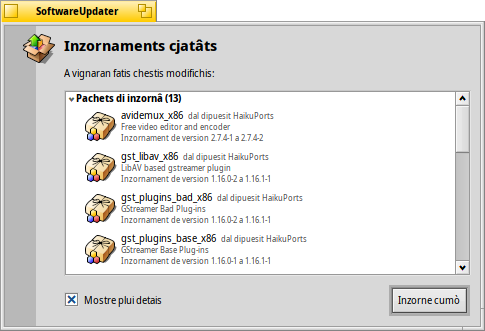
After launching, SoftwareUpdater checks for updates to packages and displays them in a list with their new version and a short description.
al tacarà a discjariâ ducj i pachets e la lôr consecuente instalazion.
In base ai pachets che a son stâts inzornâts, si varà di tornâ a inviâ Haiku par fâ in mût che si completi il procès di inzornament. Par ce che al rivuarde lis aplicazions, al baste dome tornâ a inviâlis, invezit lis modifichis a Haiku stes par deventâ efetivis, a podaressin vê bisugne che il sisteme si torni a inviâ.
Every time packages are updated, installed or uninstalled (either with SoftwareUpdater/HaikuDepot or in Terminal via pkgman), a new "state" is saved at /system/packages/administrative/. This makes it possible to boot into any past state from the Boot Options, making it easy to solve issues that may arise from having installed/updated a package that doesn't work as expected.
As these "state" folders hold copies of the updated/uninstalled packages, the "administrative" folder can grow quite significantly over time.
Under you find an option to to include the name of the repository for each package and show both the old and new package versions.
There's also a setting to limit the size of the above mentioned "administrative" folder. You can after every update to remove all states older than 30 days. The last 10 states are always preserved, even if they were older than 30 days.
Regredî a une revision precedente di Haiku
Al è râr ma al è pussibil che un inzornament a une ultime revision di Haiku ("hrev") al introdusedi un regression che ti da fastidi. Dal menù des opzions di inviament tu puedis cjamâ un stât precedent che al funzionave (Viôt Il Boot Loader - Risoluzion dai problemis). Cjate l'ultin stât funzionant e inviilu.
Par regredî in mût permanent a cheste revision, tu âs di pontâ il dipuesit di 'Haiku' a chê hrev. Tu cjatis la revision corinte sot di "Informazion su Haiku" dal Deskbar. Tant che esempli: par regredî ae revision hrev56231, vierç un Terminâl e scrîf:
pkgman add https://eu.hpkg.haiku-os.org/haiku/master/$(getarch)/r1~beta3_hrev56231
pkgman full-sync
Fâs câs che cumò tu sês blocât cun chê revision, Haiku nol varà nissun gnûf inzornament. Tu varessis di segnalâ la regression e judâ a comedâle, se tu puedis. Une volte comedade - ten di voli i regjistris di consegne - tu puedis tornâ a passâ al dipuesit "current" cun:
pkgman add https://eu.hpkg.haiku-os.org/haiku/r1beta3/$(getarch)/current
pkgman full-sync